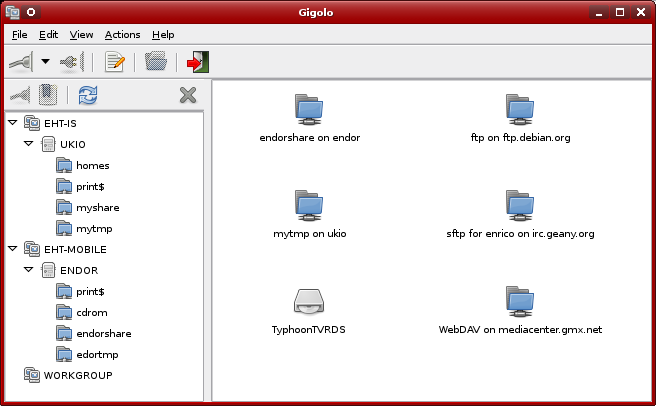
Gigolo is a natty front-end for managing remote filesystems using GNOME Virtual File System (GVfs or GIO). Should you be interested in getting it?
Gigolo's key card is its minimalism. It's very, very efficient, and tucks a lot of the nastier protocol stuff out of view. The UI - user interface - is clean and bold, clearly segregated and obviously purpose-built.
While the great UI is going to be a plus for all users - it makes mounting filesystems a breeze, and you can patrol them using bookmarks (more on this later) - tucking all the protocols out of the way may not appeal to the Linux crowd. Why? Because Linux users are notoriously fond of tinkering with the inner workings of things, and here's they're not simply posted to a debugging console.
How to choose an operating system for your computer and how to run it there.
27 Sept 2012
Juggling remote filesystems with Gigolo
| About DarkDuck DarkDuck is a person with whole life spent in IT area. It does not mean only Linux, but also SAP systems. Learn more about him here. |
If you like this blog, please do not forget to share or put it into your favourites:
You can also subscribe to this blog via e-mail or RSS, links are on the right. This is absolutely FREE!
Labels:
guest post
25 Sept 2012
Create Live USB with Linux like you have never done before!
I like to try and review different free open source operating systems. This is what this blog is about.
The majority of my reviews are for Live runs of the OS’s. Wherever possible, I try to use a Live USB, not Live CD or Live DVD run. The reason is obvious: the speed of a USB run is much higher than that of an optical drive. This makes an overall experience better and wastes less time.
Unfortunately, a Live USB run is not always possible for me. The reason is in my laptop’s BIOS, which does not work properly with hybrid ISO images.
Some time ago I wrote an article titled "Different methods to create Live USB", where 6 different methods were described. Obviously, the most widely used of them are the command dd and the tool Unetbootin.
Since hybrid images are not usable for me, the command dd is rarely good for me. Unetbootin is my most often used method.
Unfortunately, Unetbootin is not always satisfactory either. The most recent case was my experiment with OpenSuSE 12.1 Li-f-e. That time round, I had to revert to the Live DVD method.
That was a trigger to one of my readers to join the scene. The person under the nickname Cyberorg (his real name is Jigish Gohil, by the way) mentioned a new method, which I’ve never heard of before. It is his own tool, which creates a Live USB from ISO images with a method different from Unetbootin’s. Of course, I wanted to try it.
| Image of Dariolynx |
Unfortunately, a Live USB run is not always possible for me. The reason is in my laptop’s BIOS, which does not work properly with hybrid ISO images.
Some time ago I wrote an article titled "Different methods to create Live USB", where 6 different methods were described. Obviously, the most widely used of them are the command dd and the tool Unetbootin.
Since hybrid images are not usable for me, the command dd is rarely good for me. Unetbootin is my most often used method.
Unfortunately, Unetbootin is not always satisfactory either. The most recent case was my experiment with OpenSuSE 12.1 Li-f-e. That time round, I had to revert to the Live DVD method.
That was a trigger to one of my readers to join the scene. The person under the nickname Cyberorg (his real name is Jigish Gohil, by the way) mentioned a new method, which I’ve never heard of before. It is his own tool, which creates a Live USB from ISO images with a method different from Unetbootin’s. Of course, I wanted to try it.
| About DarkDuck DarkDuck is a person with whole life spent in IT area. It does not mean only Linux, but also SAP systems. Learn more about him here. |
If you like this blog, please do not forget to share or put it into your favourites:
You can also subscribe to this blog via e-mail or RSS, links are on the right. This is absolutely FREE!
Labels:
usb
23 Sept 2012
Peppermint OS Three: between the cloud and the desktop
That’s why cloud-oriented operating systems come into play. What are the most widely-known of them? I can name three from the top of my memory: Chrome OS, xPud and Peppermint OS.
Let’s talk about Peppermint OS today. Their latest release was issued at the end of July 2012, when Peppermint OS Three was presented.
You can download the ISO image of this operating system either from one of four mirrors, of from the torrent. I used the latter option to get my own image of Peppermint OS Three 32-bit. The distribution ISO image size is only 554 Mb.
I used Unetbootin to "burn" the image onto the USB stick. When it was ready, the time to reboot my Fujitsu-Siemens Amilo Pi 1505 laptop had come. Choose to boot from the USB. Let's go!
| About DarkDuck DarkDuck is a person with whole life spent in IT area. It does not mean only Linux, but also SAP systems. Learn more about him here. |
If you like this blog, please do not forget to share or put it into your favourites:
You can also subscribe to this blog via e-mail or RSS, links are on the right. This is absolutely FREE!
Labels:
linux,
operating system,
peppermint,
usb
20 Sept 2012
Support this blog: vote for it!
Hello to all my readers!
Do you like this blog? I hope you do!
If you do like this blog as much as I do, please do me a favour: support it! Yes, I need your (YOUR, Y-O-U-R) support.
It's not that difficult actually.
What you need to do?
--->>> Click here <<<--- and get to the page dedicated to my blog on the contest organized by Wishfree.com. Login to that contest page using your Facebook, Twitter or LinkedIn credentials. And nominate!
Yes, that's simple!
And I thank you beforehand for all your votes! Wish me good luck, and I hope to win the competition.
Do you like this blog? I hope you do!
If you do like this blog as much as I do, please do me a favour: support it! Yes, I need your (YOUR, Y-O-U-R) support.
It's not that difficult actually.
What you need to do?
--->>> Click here <<<--- and get to the page dedicated to my blog on the contest organized by Wishfree.com. Login to that contest page using your Facebook, Twitter or LinkedIn credentials. And nominate!
Yes, that's simple!
And I thank you beforehand for all your votes! Wish me good luck, and I hope to win the competition.
We are the champions - my friends
And we'll keep on fighting - till the end!
We are the champions!
No time for losers,
'Cause we are the champions - of the world!
| About DarkDuck DarkDuck is a person with whole life spent in IT area. It does not mean only Linux, but also SAP systems. Learn more about him here. |
If you like this blog, please do not forget to share or put it into your favourites:
You can also subscribe to this blog via e-mail or RSS, links are on the right. This is absolutely FREE!
18 Sept 2012
To Stay Informed, Let Your Computer Email You
Wouldn't it be nice to have your server send you regular email about system issues? That's an easy task for two simple SMTP email programs, sSMTP and Blat. These utilities don't provide all the options of an enterprise-class mail transfer agent (MTA) such as Sendmail, Qmail, or Postfix, but their simplicity makes them easy to manage and use.
| About DarkDuck DarkDuck is a person with whole life spent in IT area. It does not mean only Linux, but also SAP systems. Learn more about him here. |
If you like this blog, please do not forget to share or put it into your favourites:
You can also subscribe to this blog via e-mail or RSS, links are on the right. This is absolutely FREE!
Labels:
guest post
16 Sept 2012
OpenSuSE 12.2 GNOME: a step ahead
None of my previous meetings with different OpenSuSE products finished well. Although I liked OpenSuSE 11.4 KDE more than OpenSuSE 11.4 GNOME, I still was not too happy with it.
OpenSuSE 12.1 Li-f-e, which I reviewed few days ago, did not change my opinion in that area.
In the meantime, I decided to give OpenSuSE 12.2 a go. This release saw the world at the beginning of September 2012.
As you may know, I run my own site Buy Linux CDs, and also list some Linux CDs on eBay. I got some orders for OpenSuSE 12.2 disks. Because of that, I had an option to try the distribution myself: I test each CD before dispatch. These all were KDE versions of OpenSuSE 12.2. If you want to know more about OpenSuSE 12.2 KDE, you can read other reviews, for example the one from Prashanth. I can only say that I was still unimpressed by this release. But my curiosity made me to try yet another version: OpenSuSE 12.2 GNOME.
Update 01 October 2012: After some consideration, I wrote a my own review of OpenSuSE 12.2 KDE.
This time round, I decided to follow the steps from the official OpenSuSE manual, and create a LiveUSB from their ISO image. The ISO image size is 671 Mb, which would fit a usual CD. The site’s guidance is very simple: you only need to run a dd command. To be even more pro-OpenSuSE, I ran this dd command from a LiveCD run of OpenSuSE KDE.
So, when the LiveUSB was ready, I rebooted my laptop Fujitsu-Siemens Amilo Pi 1505 and chose to boot from USB. Let's go!
OpenSuSE 12.1 Li-f-e, which I reviewed few days ago, did not change my opinion in that area.
In the meantime, I decided to give OpenSuSE 12.2 a go. This release saw the world at the beginning of September 2012.
As you may know, I run my own site Buy Linux CDs, and also list some Linux CDs on eBay. I got some orders for OpenSuSE 12.2 disks. Because of that, I had an option to try the distribution myself: I test each CD before dispatch. These all were KDE versions of OpenSuSE 12.2. If you want to know more about OpenSuSE 12.2 KDE, you can read other reviews, for example the one from Prashanth. I can only say that I was still unimpressed by this release. But my curiosity made me to try yet another version: OpenSuSE 12.2 GNOME.
Update 01 October 2012: After some consideration, I wrote a my own review of OpenSuSE 12.2 KDE.
This time round, I decided to follow the steps from the official OpenSuSE manual, and create a LiveUSB from their ISO image. The ISO image size is 671 Mb, which would fit a usual CD. The site’s guidance is very simple: you only need to run a dd command. To be even more pro-OpenSuSE, I ran this dd command from a LiveCD run of OpenSuSE KDE.
So, when the LiveUSB was ready, I rebooted my laptop Fujitsu-Siemens Amilo Pi 1505 and chose to boot from USB. Let's go!
| About DarkDuck DarkDuck is a person with whole life spent in IT area. It does not mean only Linux, but also SAP systems. Learn more about him here. |
If you like this blog, please do not forget to share or put it into your favourites:
You can also subscribe to this blog via e-mail or RSS, links are on the right. This is absolutely FREE!
Labels:
linux,
new release,
opensuse,
operating system,
usb
13 Sept 2012
5 highly rated Linux OS distributions
First released in 1991 by Linus Torvalds, Linux is an open-source operating system derived from the UNIX OS. The philosophy of such open-source operating systems is that they are community-driven; Linux evolves to meet the demands and wishes of its users. There are many great Linux distributions to choose from, each boasting their own advantages and niches. Some designed to be very user-friendly, others intended to give power users greater control over their systems. Here are five of the most highly rated Linux distributions on offer today.
| About DarkDuck DarkDuck is a person with whole life spent in IT area. It does not mean only Linux, but also SAP systems. Learn more about him here. |
If you like this blog, please do not forget to share or put it into your favourites:
You can also subscribe to this blog via e-mail or RSS, links are on the right. This is absolutely FREE!
Subscribe to:
Posts (Atom)